Rebuild Trigger Policy (Bndtools Eclipse Plugin)
Note: This is an optional Bndtools Eclipse IDE optimization, not a core bnd feature. The underlying mechanism is the JAR Lifecycle Listener plugin interface.
Problem
In bnd workspaces, downstream projects check whether to rebuild by inspecting their dependency JAR’s lastModified timestamp. By default, every rebuild updates this timestamp, causing all downstream projects to rebuild even when nothing relevant to them changed.
This cascade rebuild problem is particularly painful in incremental build scenarios (e.g. IDE) where many small changes accumulate, causing unnecessary full rebuilds everytime you save a change in a .java file. A typical worst-case scenario was a small change of javadoc or editing a method in a java class of a util bundle which is used in all other bundles of the workspace. This can cause a full rebuilt of the workspace which can take up to a minute or more, although nothing relevant to the downstream consumer bundles changed.
“Relevant” in OSGi terms are usually changes in the public API of classes in exported packages (e.g. method parameter or return types, new or removed methods).
The solution
The rebuild trigger policy is a Bndtools plugin has a option “Optimized” that can avoid the problem above, using a trick. It preserves JAR timestamps when the rebuild does not produce a meaningfully different artifact. It uses two levels of comparison:
- Content digest – SHA-1 of entire JAR (byte-for-byte identical)
- API digest – SHA-1 of exported API surface (public/protected types, methods, fields in
Export-Package)
If either matches the previous build, the timestamp is preserved, preventing downstream cascade rebuilds. This results in only building the single bundle which was touched, which is much faster.
If something “relevant” (in the public API of classes in exported packages) changes, then the downstream cascade is happening and of course expected. But in practise those changes are less frequent than non-API changes which is the whole reason for this optimization.
Eclipse Bndtools Configuration
Bndtools Eclipse IDE provides a UI to enable this optimization:
Preferences → Bndtools → Build → Rebuild Trigger Policy
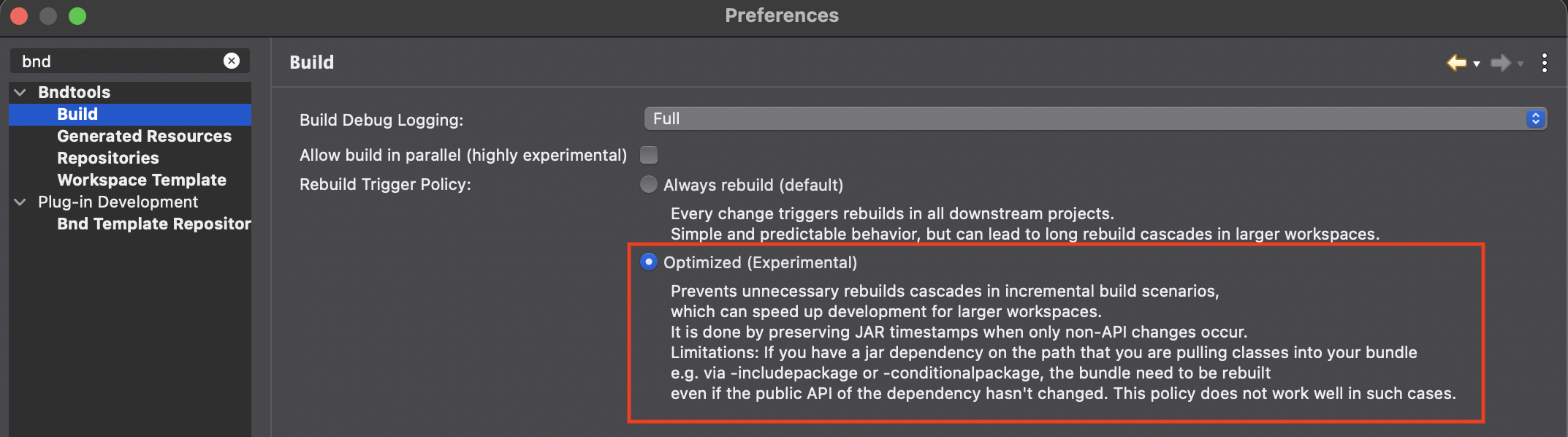
Options:
- “Optimized (skip if API unchanged)” – Enable the new digest-based timestamp preservation for avoiding downstream rebuild cascades
- “Always rebuild (default)” – Standard behavior; all changes trigger downstream rebuilds
Current Status
The Bndtools Explorer toolbar displays the current rebuild policy status:
- “Rebuild: Always” – Default policy is active
- “Rebuild: Optimized” – API-based optimization is enabled
Click the status to open preferences.
Limitations
This pragmatic approach (or trick / cheat) trades perfect accuracy for simplicity:
- ✅ Works well for typical Eclipse IDE incremental builds where small changes accumulate
- ❌ Not recommended for highly dynamic build environments with complex classpath interdependencies and heavy use of bnd features like
-includeresourceor-conditionalpackagewhich may not always be triggered for rebuild by this plugin. If you find problems, just switch back to the default ‘always’ policy or do a full workspace clean build - ❌ Not recommended for scenarios requiring perfect timestamp accuracy for external build tools
In practice, this optimization provides substantial benefits by preventing most unnecessary rebuilds while maintaining reliability. If you discover issues or unexpected results, try a full workspace rebuilt or change back to the “Always” option.
Technical background
The rebuild trigger policy is a Bndtools plugin that preserves JAR timestamps when the rebuild does not produce a meaningfully different artifact. It uses two levels of comparison:
- Content digest – SHA-1 of entire JAR (byte-for-byte identical)
- API digest – SHA-1 of exported API surface (public/protected types, methods, fields in
Export-Package)
If either matches the previous build, the timestamp is preserved, preventing downstream cascade rebuilds.
Policies
| Policy | Behavior |
|---|---|
always (default) |
Every rebuild updates the JAR timestamp. All downstream projects consider the dependency stale and rebuild. |
api |
Preserves timestamp when content is byte-identical OR exported API is unchanged. Only consuming projects rebuild when the API actually changes. |
How It Works
The Bndtools RebuildTriggerPolicyListener implements the JAR Lifecycle Listener interface:
Before write phase:
- Compute SHA-1 digest of JAR bytes (timeless, excludes embedded timestamps)
- Compute SHA-1 digest of exported API surface (using
DiffPluginImpl) - Store in context for after phase
After write phase:
- Load previous digests from sidecar files (
.digest,.api-digest) - If content digest matches → preserve timestamp (fast path, no changes)
- Else if API digest matches → preserve timestamp (content changed but API didn’t)
- Else → use new timestamp (both content and API changed)
- Store new digests for next build
Sidecar Files
When the api policy is active, Bndtools stores two small sidecar files next to each output JAR:
myproject.jar
myproject.jar.digest          # SHA-1 of entire JAR content (hex-encoded)
myproject.jar.api-digest      # SHA-1 of exported API surface (hex-encoded)
These files are regenerated on every build and should be added to .gitignore.
Note: Only exported packages are analyzed. Changes to private packages or internal implementation classes are intentionally invisible (because downstream bundles cannot legally depend on them), so the timestamp is preserved.
Workspace-Level Configuration
In the java layer, the plugin is configured programmatically at the workspace level Workspace.addBasicPlugin() (not via build.bnd properties). This is done by Bndtools before building, based on the user’s Eclipse preferences.
Future Extensibility
The plugin-based design enables other build tools to implement similar optimizations without modifying core bnd:
See Also
- JAR Lifecycle Listener – Core plugin interface
- Plugin Overview
- Build Chapter – General build concepts